From the first enquiry to the last dance, all in one place.

Take function enquiries, send proposals, collect deposits and plan the day with your client: menus, guest list, seating and suppliers. Built for venues that host weddings, parties and wakes alongside normal trading.

Proposals, contracts and card paymentsClient portal, no password£49 a month, per venue

Functions run on spreadsheets and goodwill.

An enquiry in one inbox, a proposal in a Word document, payments in another system and the allergy list in a message thread. One missed email and the day is at risk.

  • Enquiries lost between an inbox, a phone and a notebook.
  • Rooms promised to a function and a normal booking at the same time.
  • Final numbers, dishes and allergies chased by phone the week before.

From enquiry to the last dance

How a function moves through Taybl

  1. 1
    An enquiry arrivesFrom your website form. Book a viewing and hold the room.
  2. 2
    Send the proposalThe client accepts, signs the contract and pays the deposit.
  3. 3
    Plan the day togetherTimeline, menus, guest list and seating, in their private portal.
  4. 4
    Run it, then see the profitA run sheet for the team, and what the function really made.
Enquiries and viewings

Every enquiry, in one place, not in your inbox.

Add an enquiry form to your website and every request lands in a pipeline with the date, the numbers and what they are after. Reply, book a viewing and move it along until it is confirmed. Nothing sits forgotten.

  • A form that matches your venue, on your own site, asking the questions you choose.
  • Viewings booked by the client, from a link in your email, using the times your team is free.
  • A pipeline from enquiry to confirmed, with a colour for every stage and the next step suggested.
  • Stalled enquiries nudged so a warm lead does not go quiet.
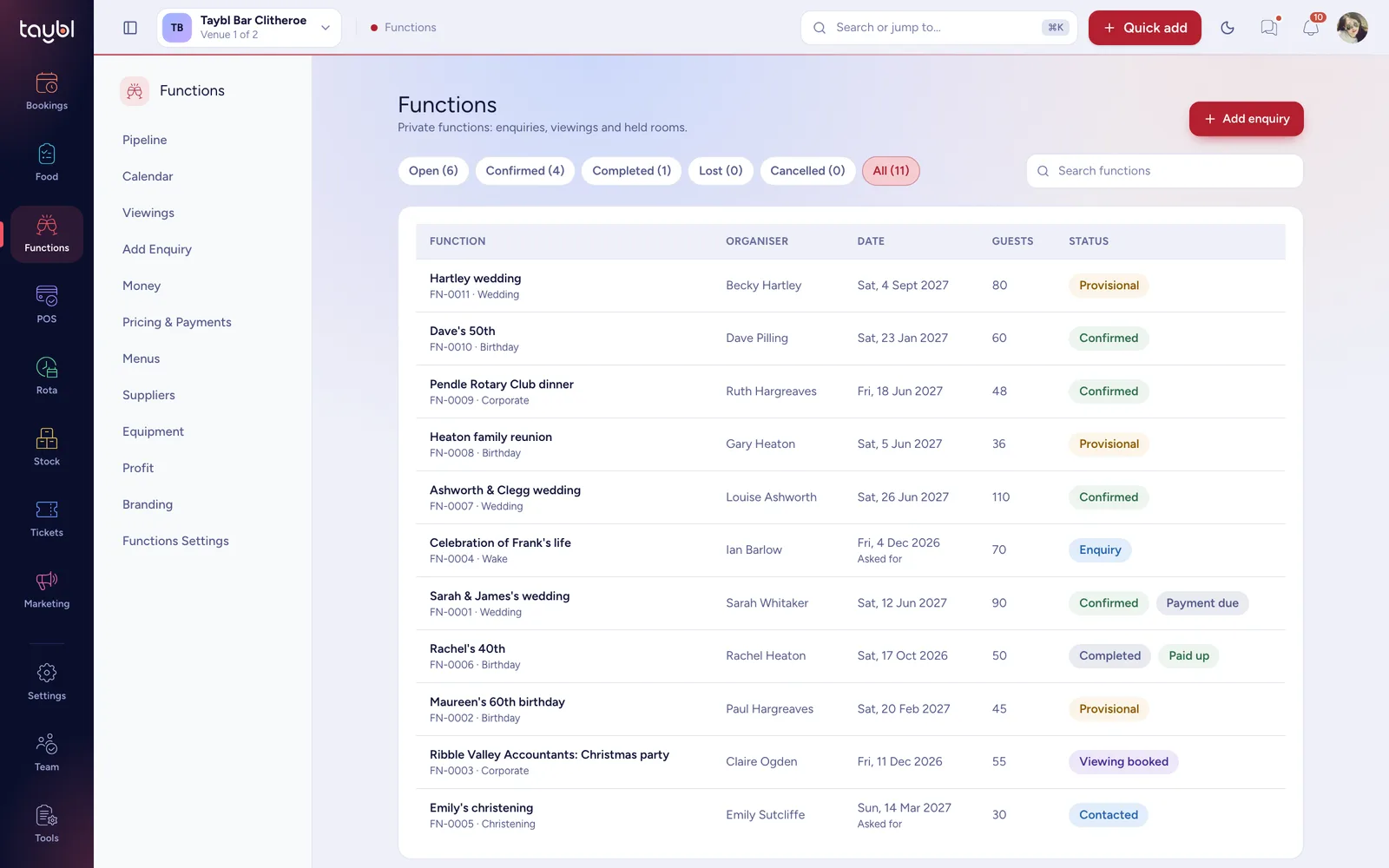
Functions · Pipeline
The Taybl Functions pipeline listing enquiries, provisional and confirmed functions with organiser, date, guests and status
Christmas party viewing bookedFriday 11 Dec, 55 guests
Rooms and dates

Hold the room. Protect your trading.

A function takes over part of a venue that is also open for business. Taybl holds the rooms for the date, stops new bookings landing in them and warns you about any that are already there.

  • Hold a room or area for the exact hours, provisionally or confirmed.
  • New bookings blocked in the held rooms, on your widget and hosted page.
  • Existing bookings listed so you can contact those guests. Taybl never moves them for you.
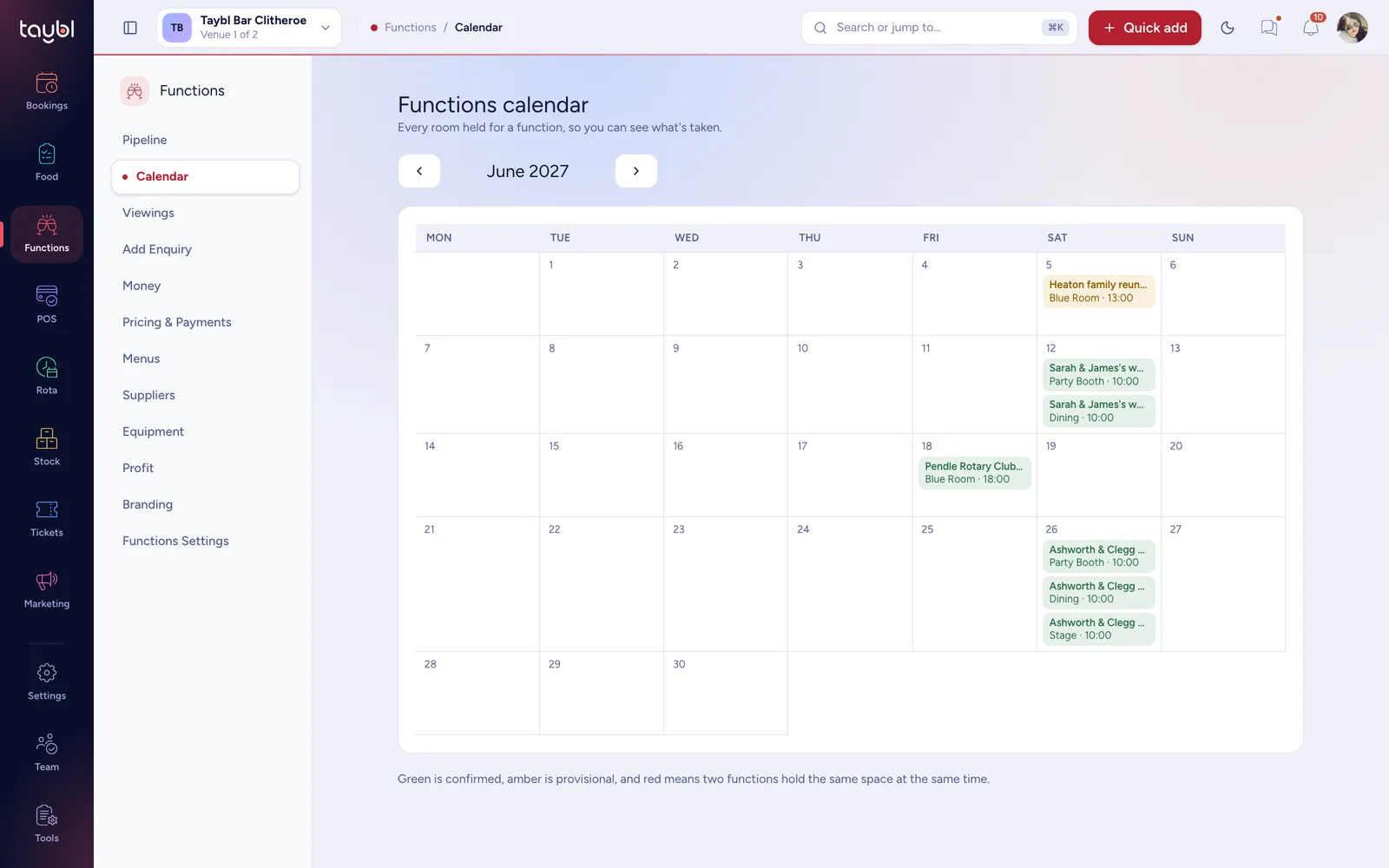
  • One calendar for every function, with a clash shown in red if two hold the same space.
Functions · Calendar
The Taybl functions calendar for June 2027 showing confirmed and provisional functions across the month
Dining Room heldOnline bookings blocked for Sat 12 Jun
Proposals and contracts

Proposals that win the booking.

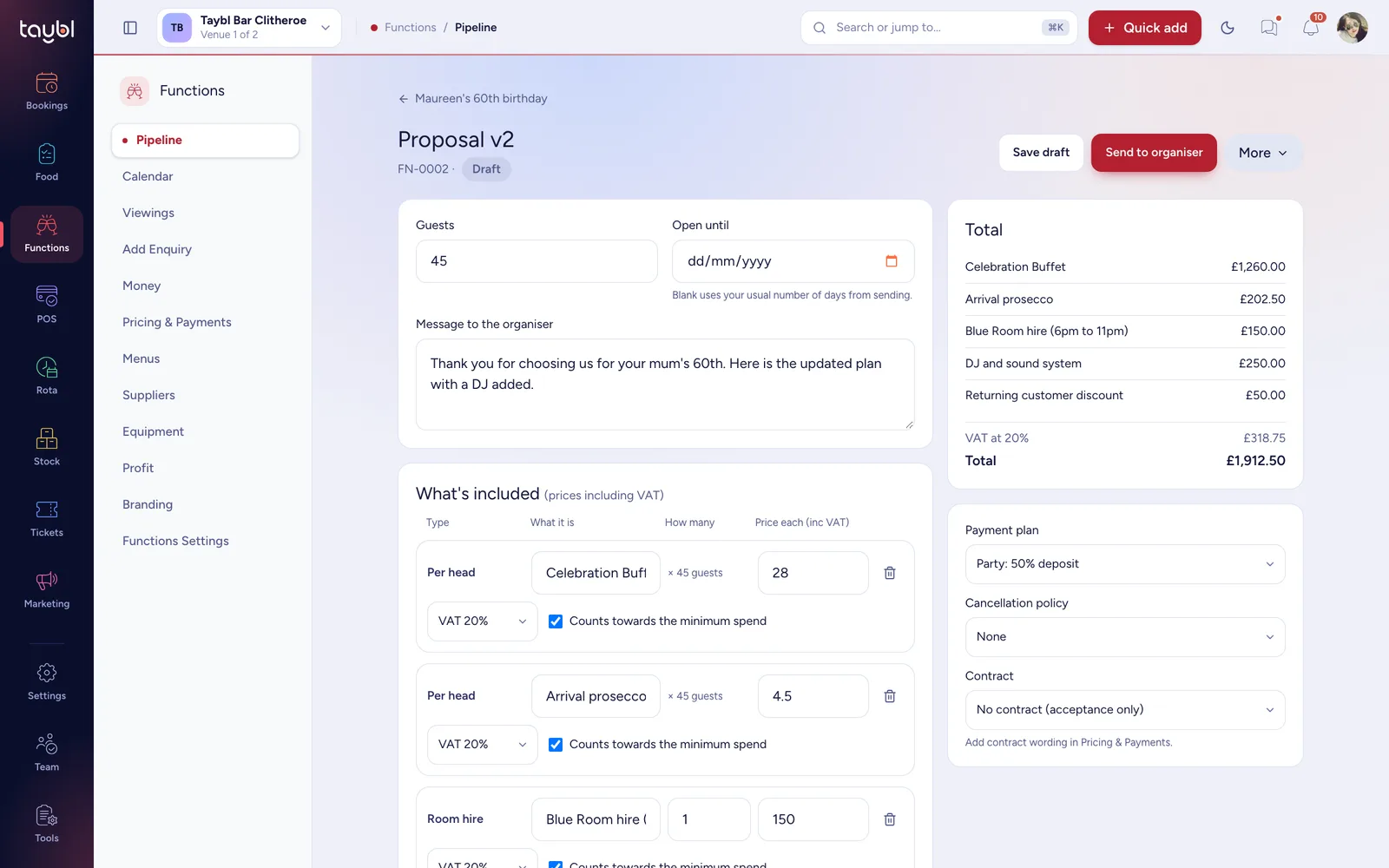
Build a proposal from per head menus, room hire, fixed extras and discounts, and price it the way you sell: any mix of per head, room hire and a minimum spend. The client reads it, accepts it and signs the contract online.

  • Per head, room hire or minimum spend, in any mix, with the greater of minimum spend and the total worked out for you.
  • VAT done properly, at the right rate on each line, whether your prices include it or not.
  • Versions kept, so you can revise a proposal and see what was agreed.
  • Contracts signed online by the organiser and anyone else who needs to sign, with a record of who agreed to what.
Functions · Proposal
The Taybl proposal builder with menu, room hire and extras lines, a live total and a payment plan
Total updates as you typeIncludes VAT and any minimum spend
Payments

Deposits and instalments, paid by card.

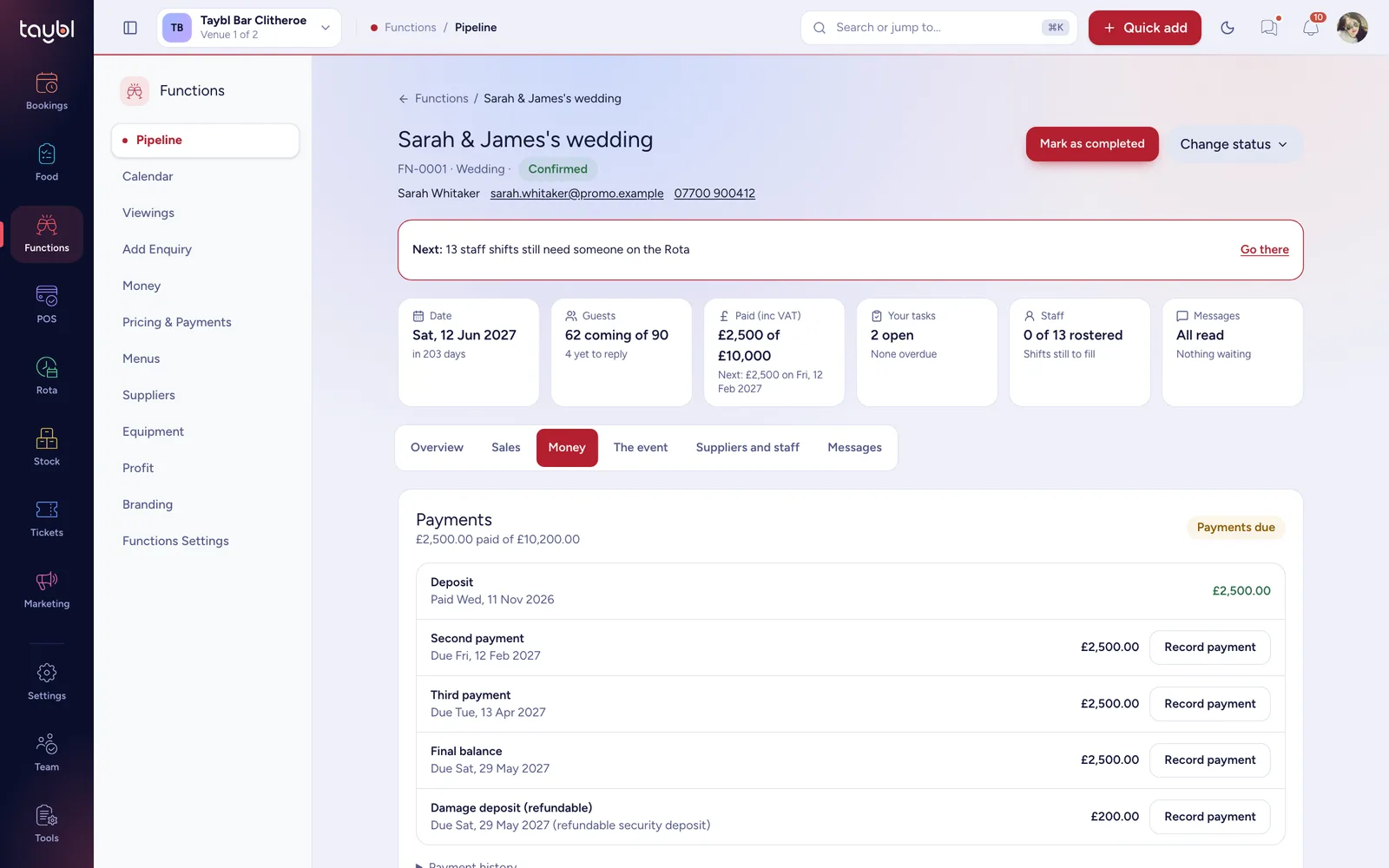
Choose a payment plan and Taybl turns the total into dated payments, takes them by card straight to your Stripe account and chases the ones that are late. You see what is owed, paid and due in one place.

  • Payment plans you set once: a deposit, instalments and a final balance, timed from acceptance or the event date.
  • Reminders sent for you before a payment is due and when it is overdue.
  • Bank transfers and cash recorded alongside card payments, and refunds made from the same screen.
  • A separate security deposit, held apart from revenue and returned after the event.
Functions · Money
The Taybl function Money tab showing a deposit paid and instalments due with a refundable damage deposit
Deposit paid£2,500 of £10,200 received
Organiser portal

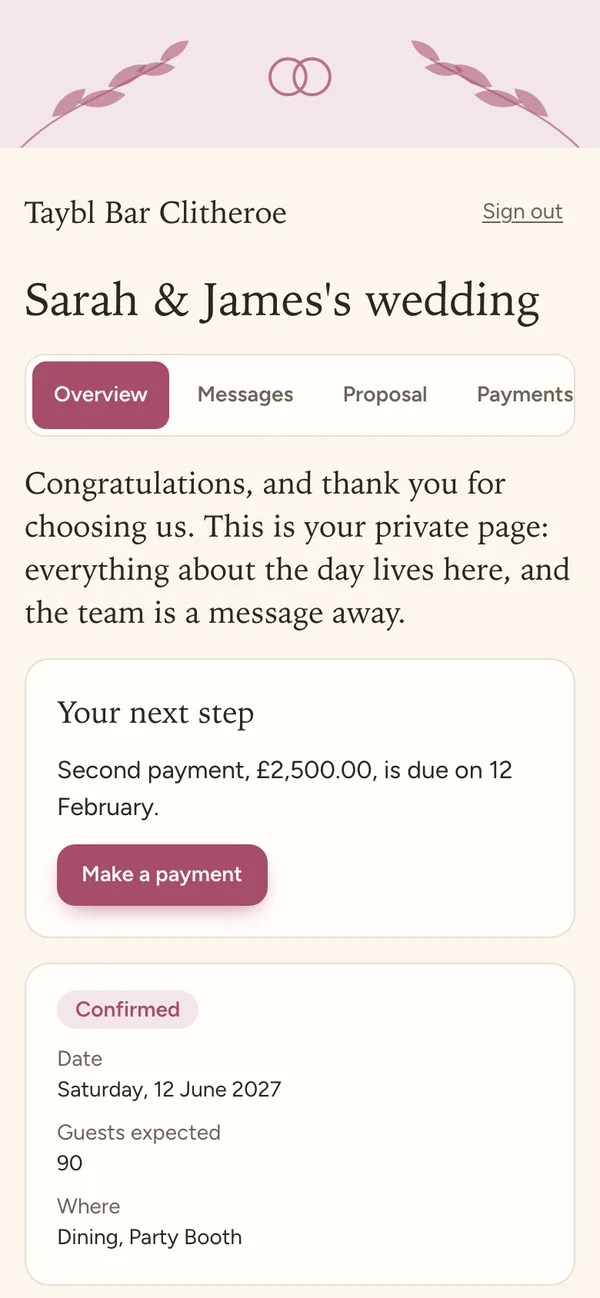
A private page for your client.

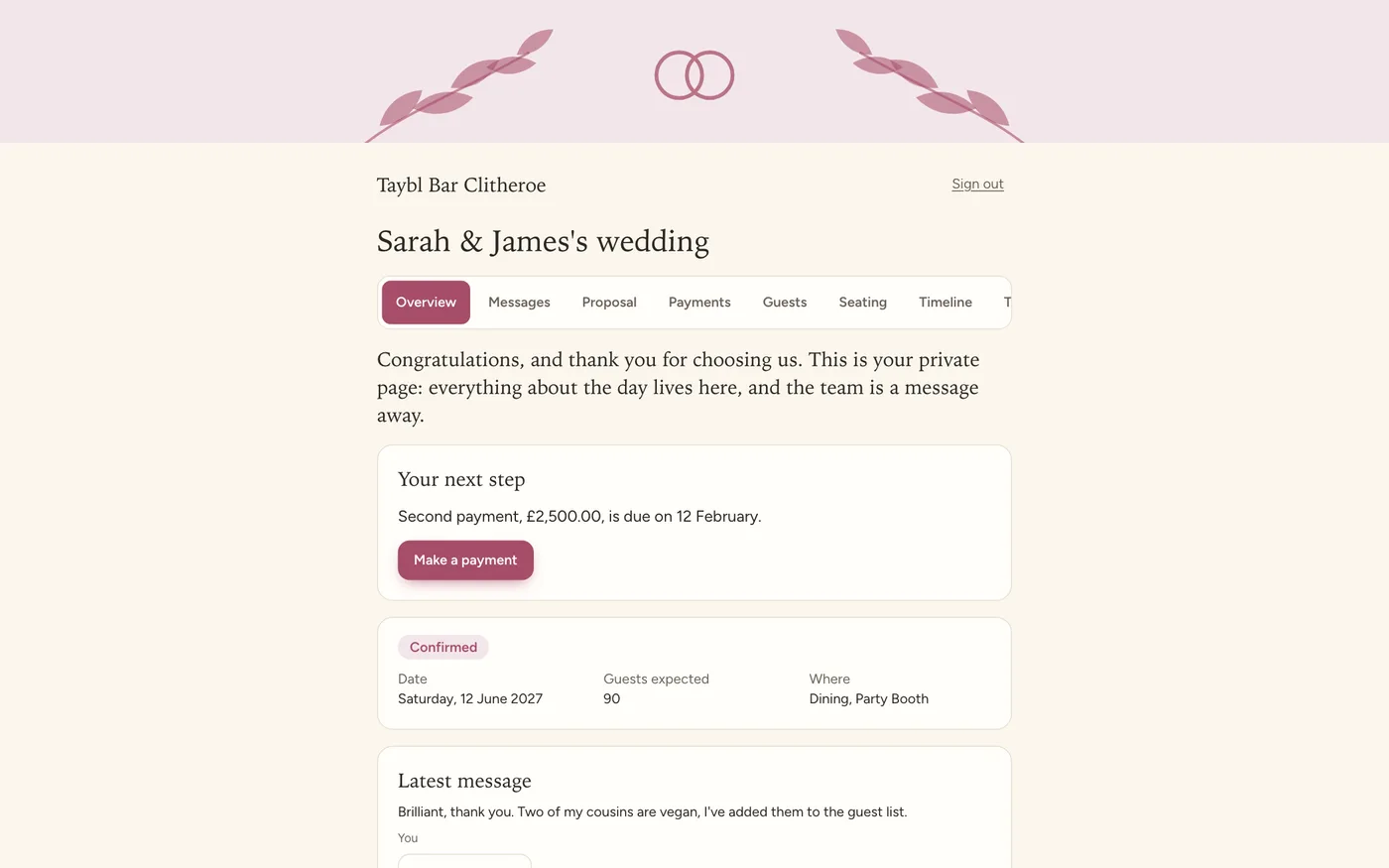
Give the person organising the day one place to work with you. They sign in with a code sent to their email, with no password to forget, and see where everything stands. It wears your venue's look, with a theme to suit a wedding, a birthday, a memorial or a business event.

  • Sign in with an emailed code, for that one function and nothing else.
  • The day's timeline built together, with rows you can lock, and a run sheet to print.
  • Tasks, messages and documents in one place, so there is no chasing by phone.
  • Your logo, colours and photos, with ready-made themes you can override.
Organiser portal
The organiser portal for a wedding showing the next step, the date, the guest numbers and the latest message in the venue's own theme
Wedding themeBlush and sage, with your own logo and photos
Guests

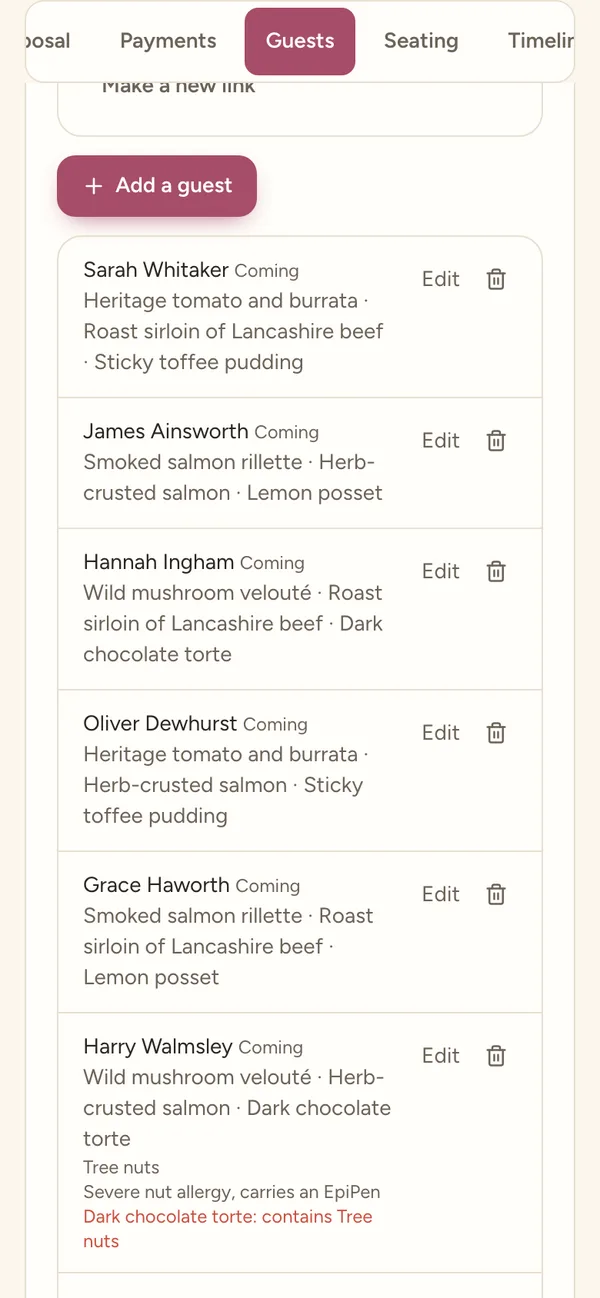
Guests reply from their phones.

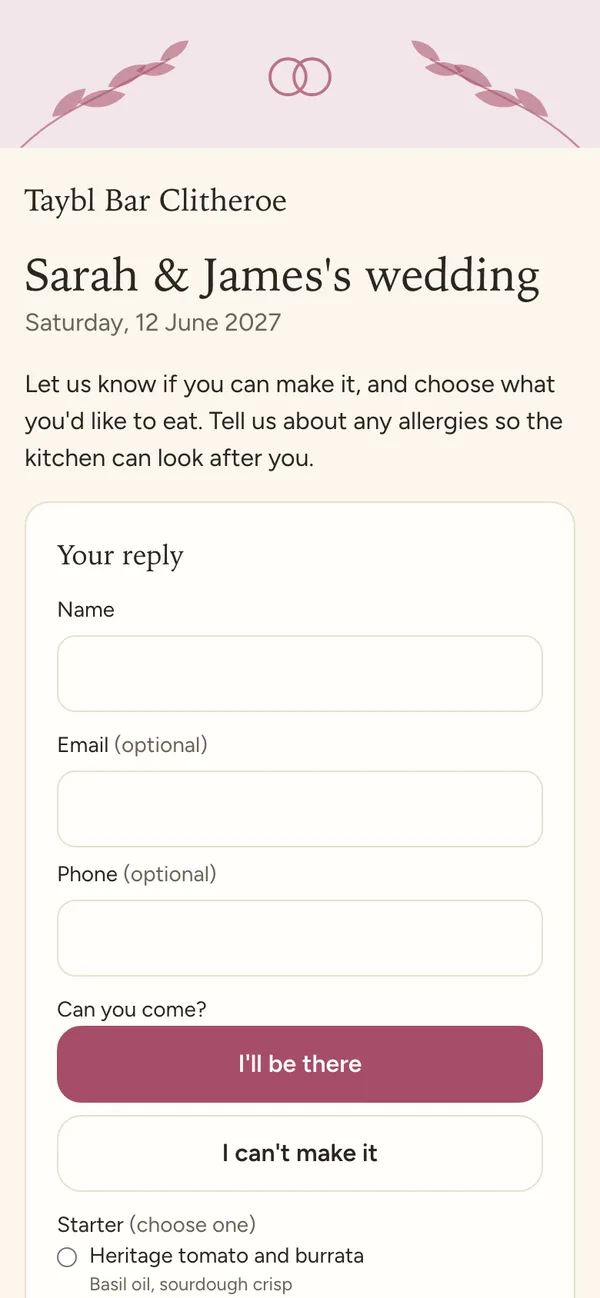
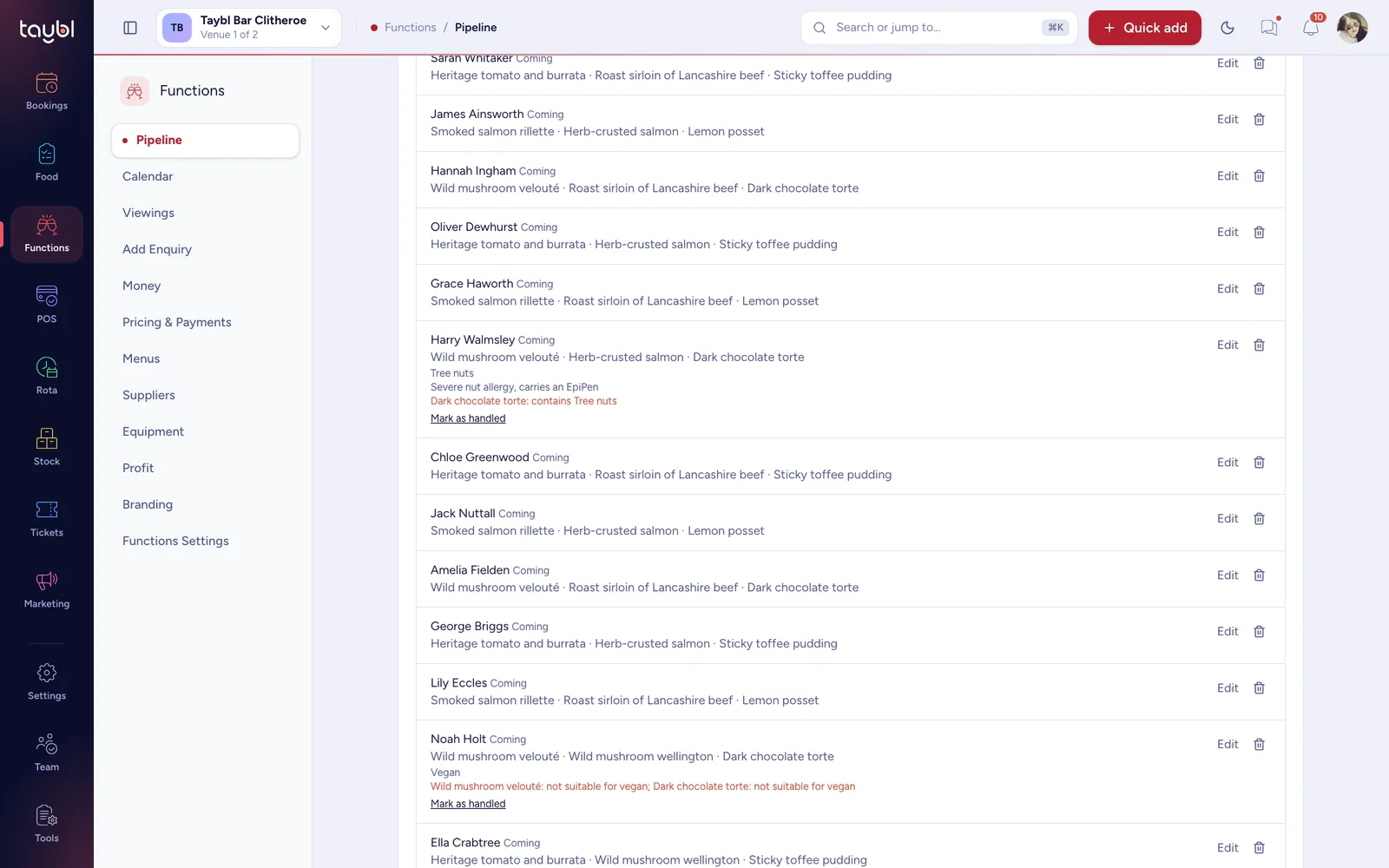
Send the organiser one link to share. Each guest says whether they are coming, picks their dishes and tells you what they cannot eat. The organiser can add guests too, and see who has replied.

  • One RSVP link for the whole guest list, with no app to download.
  • Dishes chosen per course from the menu you set for the function.
  • Allergies and diets captured at the point of choosing.
  • Edit later with a private link, until the numbers lock.
A guest replying to a wedding invitation on a phone
The organiser's guest list on a phone showing who is coming and what they chose
62 of 90 replied6 cannot come, 4 still to answer
Seating

Seat everyone, together.

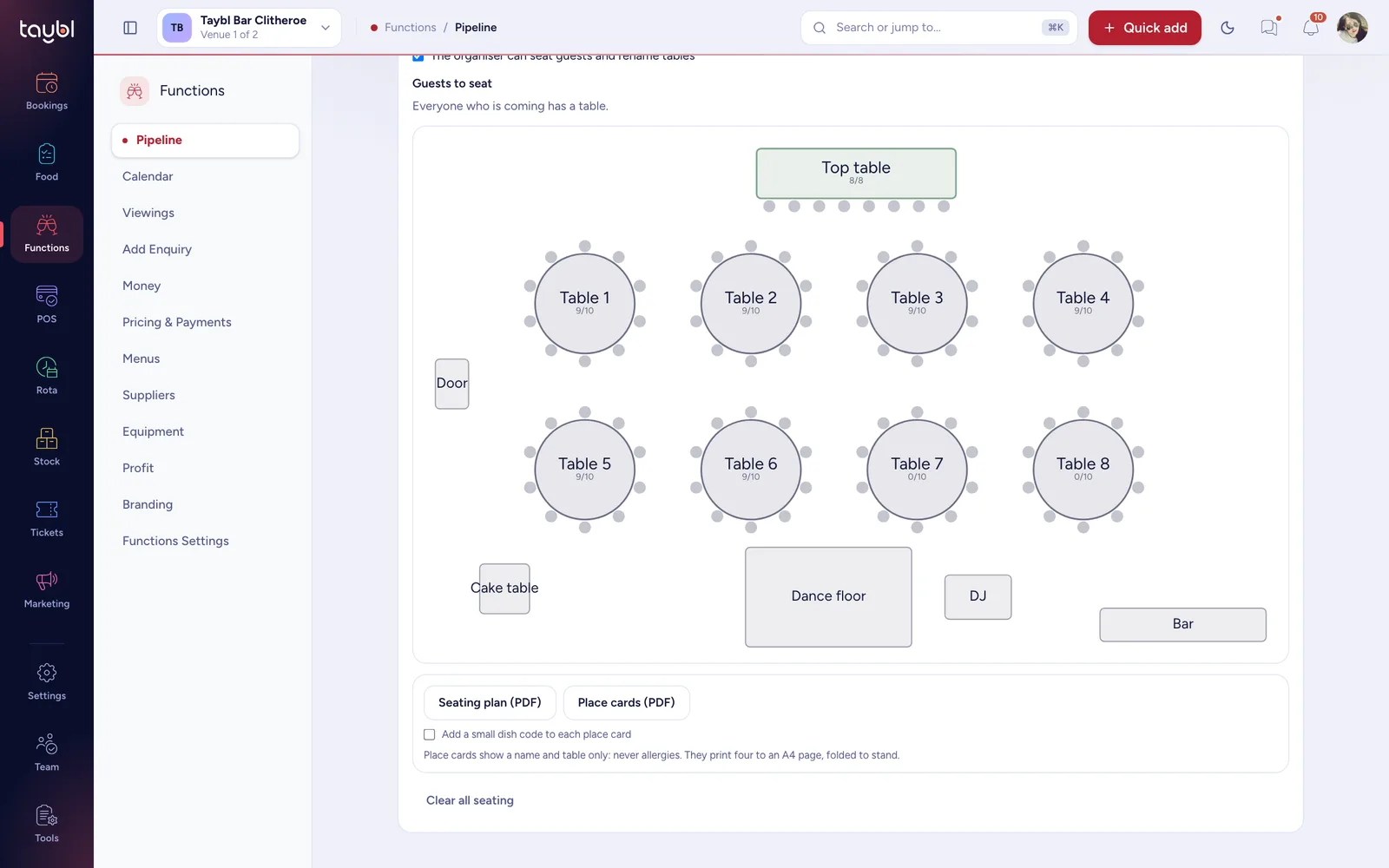
Start the layout from the room's real tables, or from ready-made banquet tables, then drag guests onto seats. The organiser can seat their own guests, you keep the final say, and the plan prints ready to set up from.

  • Start from the room or from scratch, with round, rectangular, long and top tables, a dance floor, bar, DJ and cake table.
  • Seat by dragging, for you and, if you allow it, the organiser.
  • Locked before the day so the plan the team sets up from is the plan agreed.
  • A seating plan and place cards to print, with names and tables, never allergies.
Functions · Seating
The Taybl function seating plan with a top table, eight round tables, a dance floor, DJ, cake table and bar
62 guests seated26 free seats left
Suppliers, equipment and staff

The whole team behind the day, in one place.

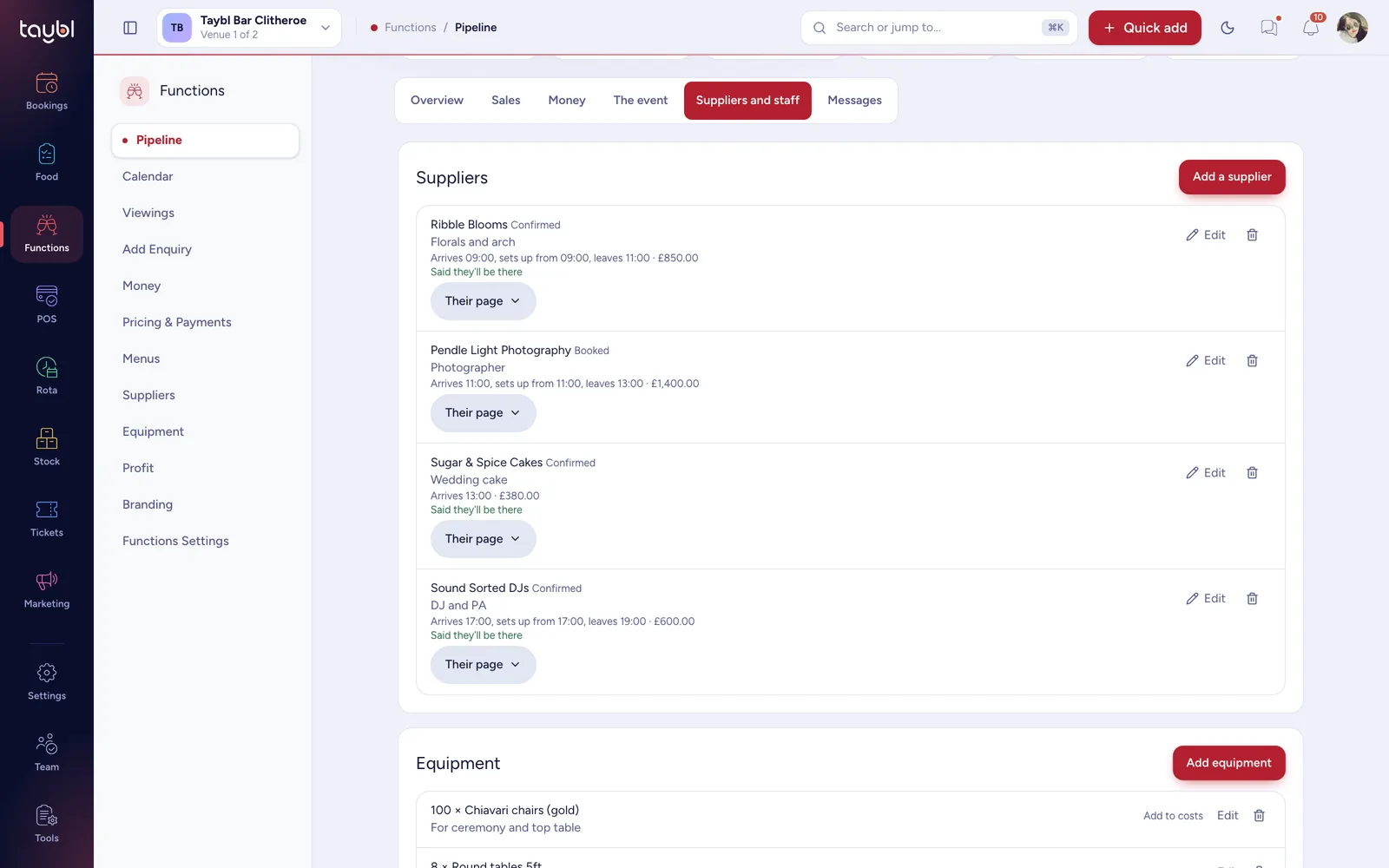
Book your florist, DJ and photographer onto the function and send each a private link showing only what they need. Track the chairs and linen you hire out, and ask the Rota for the staff the day needs.

  • A supplier directory with a private page for each booking, no login needed, and a reply to confirm.
  • Equipment tracked, with a warning when two functions want the same thing on the same day.
  • Staffing lines that show up in your Rota as shifts still to fill.
  • Run sheet for the day to print, with every timed item and who owns it.
Functions · Suppliers and staff
The Taybl function Suppliers tab with a florist, photographer, cake maker and DJ booked, and equipment assigned
Florist confirmedArrives 09:00, sets up from 09:00
Profit

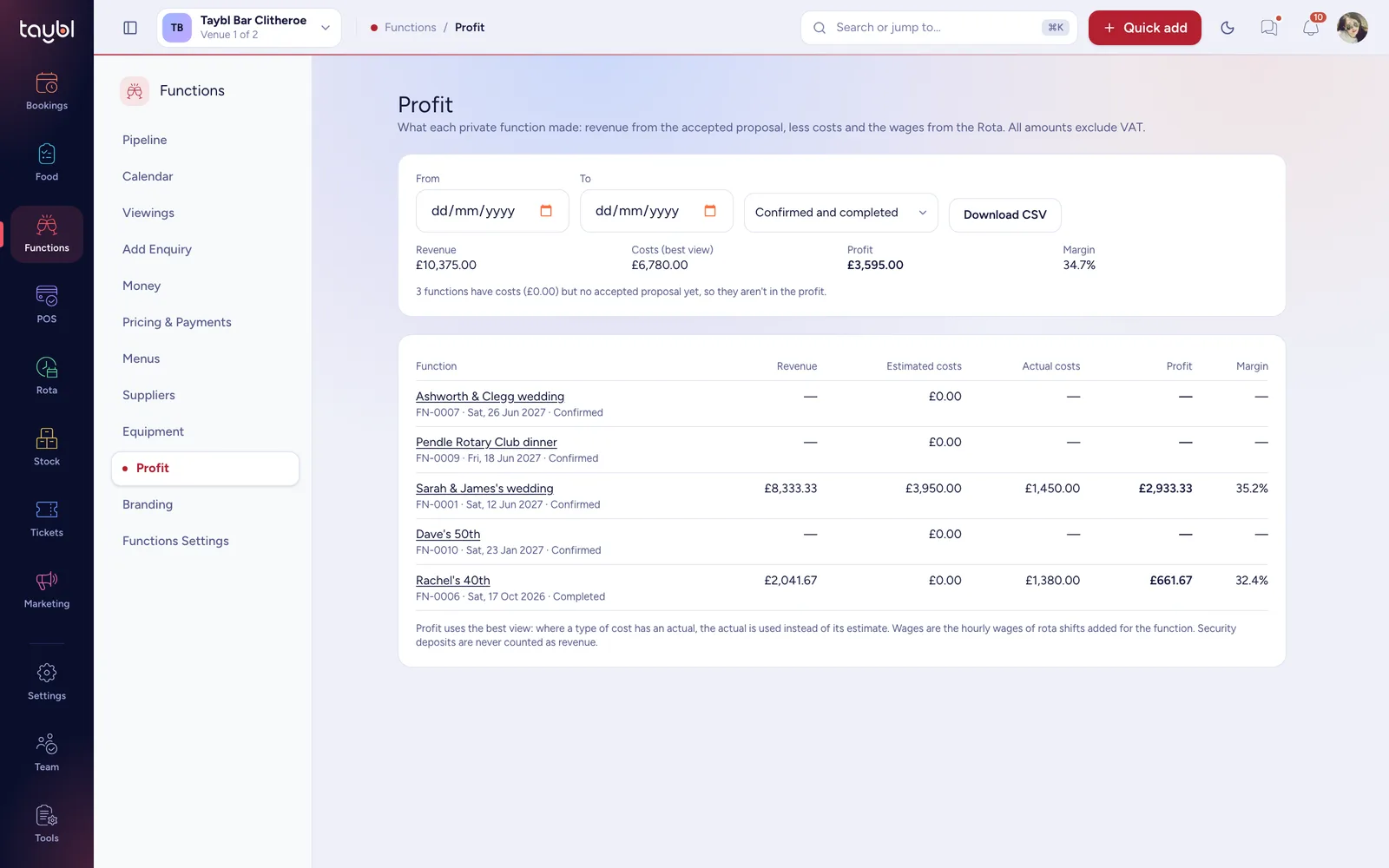
Know what each function really made.

Taybl sets the accepted proposal against the costs you enter, the supplier fees and the wages of the rota shifts for the day, so you see the profit and margin on every function, not only the takings.

  • Estimated against actual costs, using the actual wherever you have one.
  • Wages from the Rota, the real hourly cost of the shifts added for the function.
  • Profit and margin for each function, for any date range.
  • Download as a spreadsheet for your accountant.
Functions · Profit
The Taybl functions profit report listing revenue, estimated costs, actual costs, profit and margin for each function
Margin on every functionRevenue less costs and wages

Part of the platform you already use. Not another system.

Functions is for venues that host functions alongside normal trading, so it works with your bookings, floor plans and rotas instead of replacing them.

Bookings stay correct

Held rooms stop new bookings on your widget and hosted page, and you see any that were already made.

Your real floor plan

Seating can start from the room's tables, and edits to a function's layout never touch your live plan.

The Rota knows

Staffing for a function appears as shifts to fill, and their wages count towards its profit.

Managers in control

A Functions permission decides who can see and change them, off by default for everyone else.

Ready for your next function in an afternoon.

Set up the basics once and every function after that starts from them.

1

Set your defaults

Add your function types, a payment plan and a contract, and put your logo and colours on the client pages.

2

Share the enquiry form

Put the form on your website. Enquiries arrive in the pipeline with the details you ask for.

3

Win your first function

Send a proposal, take the deposit and invite the organiser to their private page.

Questions, answered.

How much does Functions cost?

£49 a month per venue, with no contract. It is an add-on to Bookings, so you need Bookings to use it.

What counts as a function?

Any private event you host alongside normal trading: weddings, birthdays, wakes, christenings, corporate dinners and parties. You choose the types you offer.

Does my client need an account?

No. They open a private link for their function and sign in with a code sent to their email. There is no password and the code only opens that one function.

What happens to bookings already in the diary on a function date?

Taybl blocks new bookings in the rooms you hold and lists the existing ones so you can contact those guests. It never moves or cancels them for you.

Can I take deposits and instalments?

Yes. Set up a payment plan, such as a deposit, instalments and a final balance. Clients pay by card to your connected Stripe account, and you can record bank transfers or cash too.

Can I price a function per head or by room hire?

Both, and a minimum spend as well. You choose which apply to each function, in any combination, and Taybl works out the total, including VAT.

Are allergies checked?

Yes. Every dish in a function menu carries its allergens, and each guest's choices are checked against what they told you. A clash is flagged before the kitchen sheet is printed.

Can the organiser seat their own guests?

If you allow it. You can let the organiser drag guests onto seats, lock the plan a few days before the event, and still make changes yourself.

Can I make the client pages look like my venue?

Yes. Add your logo, colours, a banner and a welcome message, and choose a theme such as wedding, birthday, corporate or memorial. The organiser cannot change them.

Do I need Taybl Rotas or Stock?

No. Without Rotas you can still enter costs by hand. With it, staffing lines for a function appear as shifts to fill and their wages feed the profit report.

Run your next function in Taybl.

Functions is £49 a month with Bookings. Try Taybl free for 14 days, and we will help you set up your first function on a free 2-hour onboarding call.

14 days, every featureNo credit card requiredFree 2-hour onboarding callFunctions £49 a month, per venue
A wedding reception table set for dinner with candles and flowers