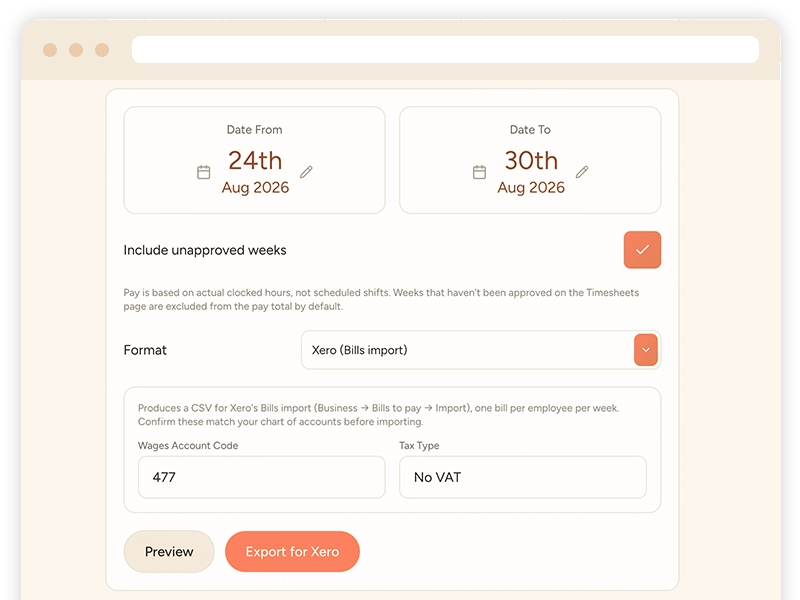
Payroll Manager

Export payroll as pre-formatted CSV or Excel files, or use our direct Xero, Sage or QuickBooks integrations.

Export payroll as pre-formatted CSV or Excel files, designed to be compatible with your Payroll software, or use our direct Xero, Sage or QuickBooks integrations to automatically add payroll data to your accounting software, totally hands free!


Frequently Asked Questions

How do I get hours into payroll?
Export a pre-formatted CSV or Excel file, or use the direct Xero, Sage or QuickBooks integrations.
Where do the hours come from?
Approved timesheets, which are built from clock-in and clock-out data.
Do I need a separate payroll system?
Taybl prepares the pay data; you still run payroll in your accounting software or payroll provider, which the integrations connect to.
Taybl Restaurant Management Software - Payroll Export

The app also includes:

Daily Briefing

Give staff a quick overview of the day ahead, complete with your own custom note of things to bear in mind.

AI Rota Builder

Using bookings, availability & required hours, historic data, popular dates & weather, AI builds the rota for you.

Clock-in & Clock-out

Teams clock in & out with the mobile app, geofenced to ensure they’re at the venue when they start their shift.

Time Sheets

Time sheets are reviewed weekly, with any abnormalities highlighted for your review, then approved with 1 click.

Intelligent Forecasting

Our forecasting tools including booking integration helps you accurately forecast staffing, revenue and cost.

Shift Swaps

Allow staff to swap shifts with equal-skilled team members in the mobile app, ready for you to approve or deny.

Holiday & Leave

The team check their leave allowances and request holidays in the mobile app, you approve or deny requests.

Team Availability

The team set their recurring and one-off availability in the mobile app, shown on the rota builder for you.
Not found the feature you want? Ask our team!